Help / TheyRave Broadcasting Studio
Your Go live overlays as layers
Show the goal bar, countdown and wheel from your TheyRave Backstage on stream.
An overlay is a graphic drawn on top of your stream. TheyRave makes three for you in Backstage, under Go live: a goal bar, a countdown and a wheel. TRBS can show them as layers.
Before you start: a TheyRave account, with the overlays set up in Backstage.
Copy your overlay address
- On theyrave.com, open Backstage, then Go live.
- Copy any address under In OBS. One address is enough for all three overlays.
Add one
- In TRBS, under Layers, press Add layer.
- Press Goal bar, Countdown or Wheel.
- Paste the address into Overlay address.
- Press the button under it, such as Add goal bar.
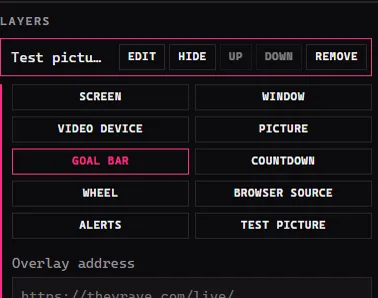
TRBS remembers the address, so the next overlay you add fills it in for you.
Move and resize it like any layer: drag it in the picture, or pull a corner.
If something goes wrong
- The layer is blank. Check the overlay is switched on in Backstage, and that the address was pasted whole.
- It shows the wrong overlay. Remove the layer and add it again with the right button.
Back to the start: Install TRBS and keep it up to date.