Help / TheyRave Broadcasting Studio
Install TRBS and keep it up to date
Put TheyRave Broadcasting Studio on your Windows PC and update it when a new version comes out.
TheyRave Broadcasting Studio, TRBS for short, is the app on your PC that sends your stream out. You build what viewers see in it, and it streams that picture to Twitch and other sites.
Before you start: you need a Windows PC and a free TheyRave account. The download asks you to sign in first, and has a link to make an account if you have none.
Install it
- Open theyrave.com/download/studio on your PC and download the installer.
- Open the file you downloaded, from your browser's downloads list or your Downloads folder.
- Let the installer finish. TRBS opens on its own when it is done.
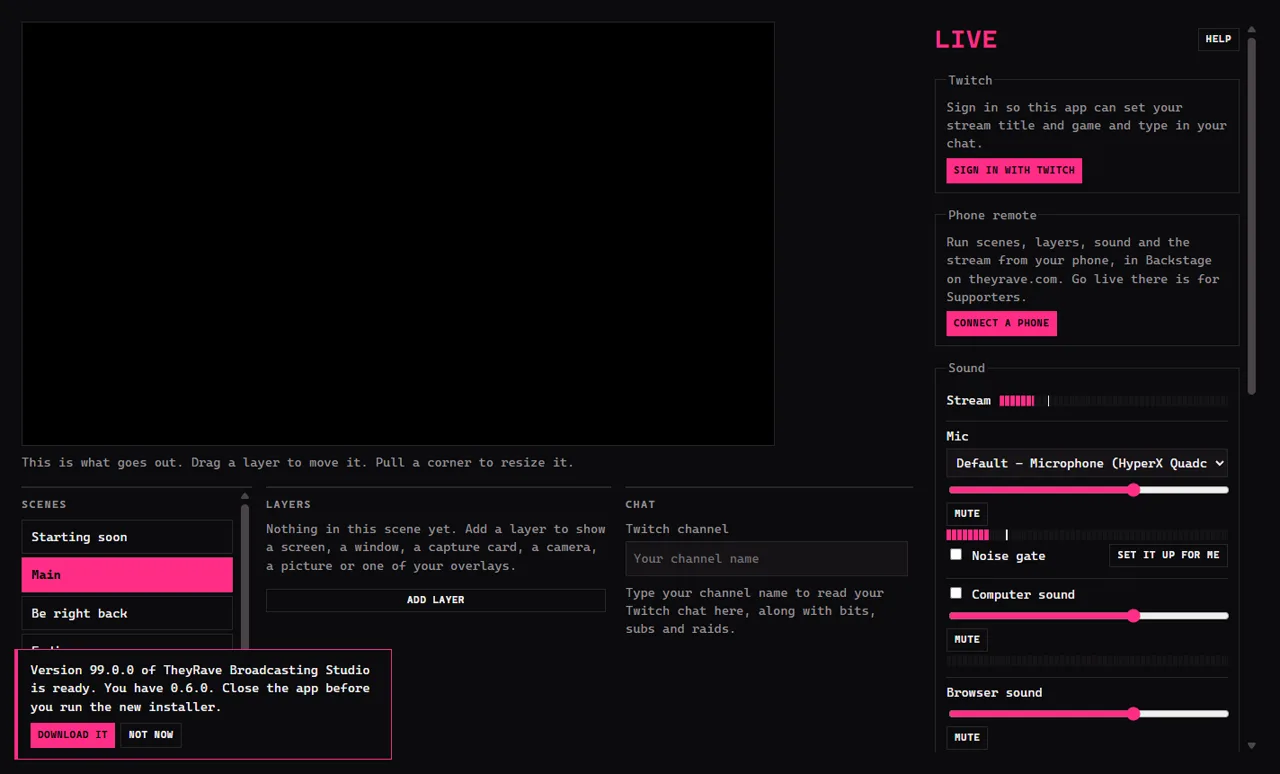
The big black box on the left is the picture: what viewers will see. Everything about the stream itself is on the right, under Live. The Help button beside Live brings you back to these pages.
Update it
TRBS asks theyrave.com for the newest version each time it opens. When there is one, a bar appears in the bottom corner saying which version is ready and which one you have. You can see it in the picture above.
- Press Update now. TRBS downloads the new version and shows how far along it is.
- TRBS closes, installs the new version and opens again by itself, usually within a minute. Your scenes and settings stay where they were.
TRBS will not update while you are live, since it has to close. End the stream first.
If you are in the middle of something, press Not now. The bar comes back the next time you open TRBS.
If something goes wrong
- Windows says it protected your PC. Press More info, then Run anyway, but only for a file you downloaded from theyrave.com.
- The installer says TRBS is still running. Close TRBS, check it is gone from the taskbar, and run the installer again.
- No update bar appears. The check needs the internet. If you are online and still see nothing, you already have the newest version.
Next: Sign in with Twitch.