Help / TheyRave Broadcasting Studio
Sound: mic, mute and the noise gate
Choose your mic, balance your sounds, mute quickly and cut out room noise with Set it up for me.
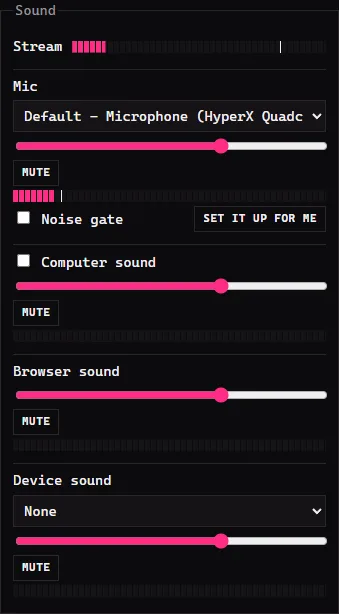
The Sound box is your sound mixer: one row per sound, each with its own volume slider, Mute button and meter. The meter is the bar that jumps when that sound plays. Stream at the top shows everything together, which is what viewers hear.
The rows
- Mic: pick the microphone you talk into.
- Computer sound: tick it to send what your PC plays, such as a PC game or music.
- Browser sound: the sound of browser sources and the Alerts layer.
- Video sound: the sound of video file layers.
- Device sound: the sound from a capture card or other device. Pick it in the list.
Drag a slider left to make that sound quieter. Press Mute to silence it, and press it again to bring it back.
The noise gate
A noise gate keeps your mic shut while you are quiet, so viewers do not hear your fan, your keyboard or the room. It opens as soon as you talk.
The easy way is to let TRBS set it:
- Pick your mic first.
- Press Set it up for me.
- Step 1 of 2: press Start, then stay quiet while TRBS listens to your room.
- Step 2 of 2: press Start, then read the words on screen aloud the way you talk on stream.
- TRBS sets the gate and switches it on. Talk and watch the light beside Noise gate: it lights while the gate is open.
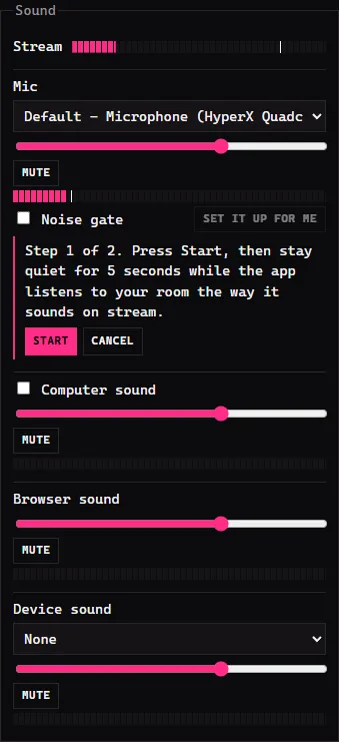
If you do not like the result, press Put back. Press Close when you are done.
You can also set it by hand. Tick Noise gate, then move Open at and Close at. The two marks on the mic meter show where they sit. Attack ms, Hold ms and Release ms change how fast it opens and shuts; most people never need them.
If something goes wrong
- The mic meter does not move. Pick a different mic in the list. The right one is the meter that jumps when you talk.
- TRBS says the mic did not hear you over the room. Check it is the mic you talk into, turn its volume up, and press Set it up for me again.
- Words get cut off. Move Close at to the left, or raise Hold ms.
Next: Chat and the pop-out.