Help / TheyRave Broadcasting Studio
Go live on Twitch and other sites
Add your stream key, test privately, then stream to Twitch and other sites at once.
Going live means TRBS sends your picture and sound to a site's server. Each site you stream to is a destination. TRBS can send to several at once, such as Twitch and Kick together.
Words you will see
- Server: the address of the site's streaming server. It usually starts with rtmp://, the kind of address live video is sent to.
- Stream key: a secret code from the site that tells it the stream is yours. Never show it on stream or give it to anyone.
Twitch
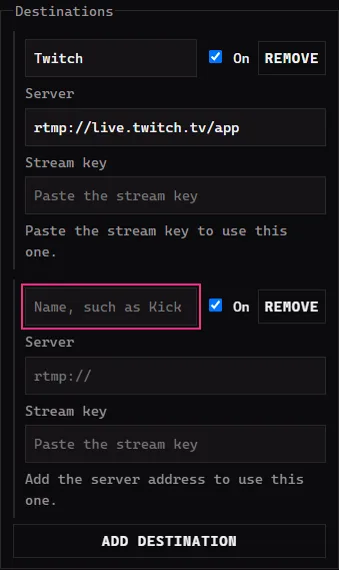
TRBS already lists Twitch under Destinations, with its Server filled in.
- On Twitch, open your Creator Dashboard, then Settings, then Stream, and copy your primary stream key.
- In TRBS, paste it into Stream key on the Twitch row. The row then says Goes out when you go live.
Another site
- Press Add destination.
- Type a name, such as Kick.
- Paste the site's server address into Server and its key into Stream key. Both are on the site's own streaming settings page.
- Tick On for each destination you want to use this time. Untick it to skip one without deleting it. Remove deletes it.
Test first
Test stream: Twitch receives it, nobody can watch is ticked to begin with. With it ticked, Twitch gets your stream but does not show it to anyone, so you can check everything works.
Other sites do not have this test mode. While you test, untick On for every destination except Twitch.
Go live
- Untick Test stream when you are ready for viewers.
- Press Go live. Each destination says Connecting. and then Live.
- Press End stream to stop.
Under the button, Frames skipped counts frames your PC or connection could not keep up with, and Upload is how fast the stream is leaving your PC.
If something goes wrong
- A destination says Paste the stream key to use this one. Its key is missing. Paste it into Stream key.
- Frames skipped keeps climbing. Close other programs, or end a game's extra windows. If Upload is low too, your internet may be too slow for the stream.
- Twitch shows nothing to viewers. Check Test stream is unticked. A test stream is not shown to anyone.
Next: Run TRBS from your phone.